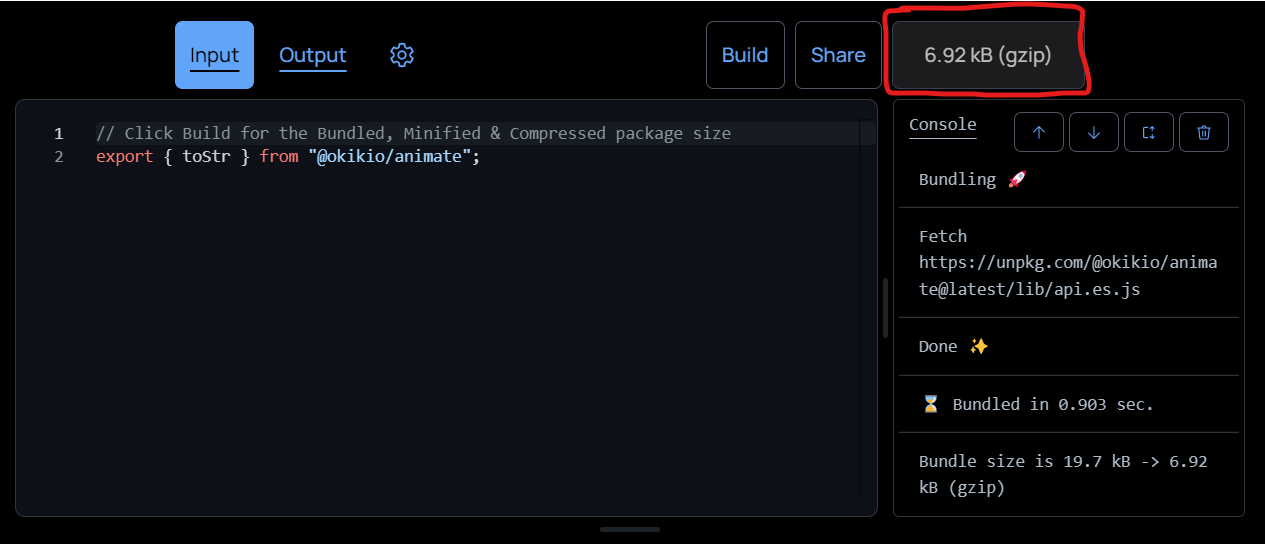
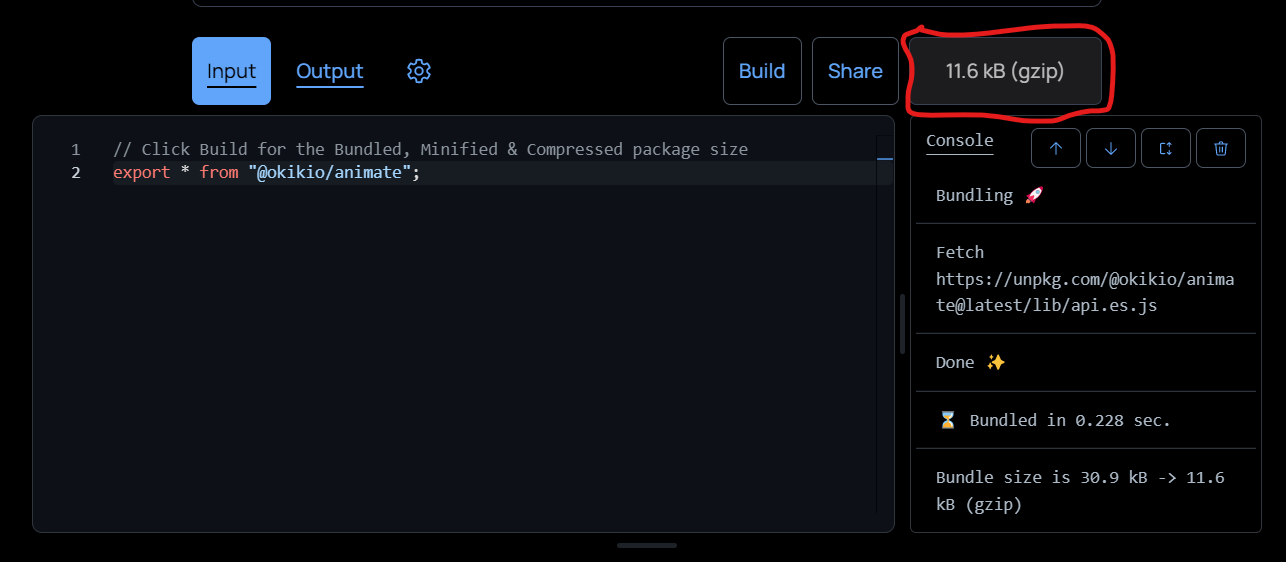
View the impact of treeshaking on bundle size.
ℹ️ Info: This is the impact treeshaking and minifying a bundle has on bundle size,
treeshaken
vs.
non-treeshaken
View the impact of treeshaking on bundle size.
ℹ️ Info: This is the impact treeshaking and minifying a bundle has on bundle size,
treeshaken
vs.
non-treeshaken
Console Results
The console functions by listing out details of the build pertinent to users e.g. fetched packages, errors, etc... This includes bundle result info. e.g.
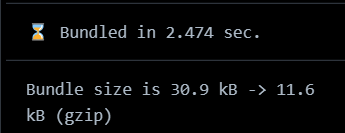
Fetching Packages
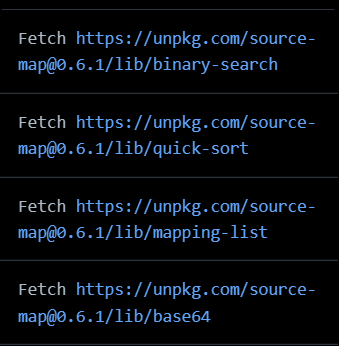
By default the console will display the progress for fetching packages, it
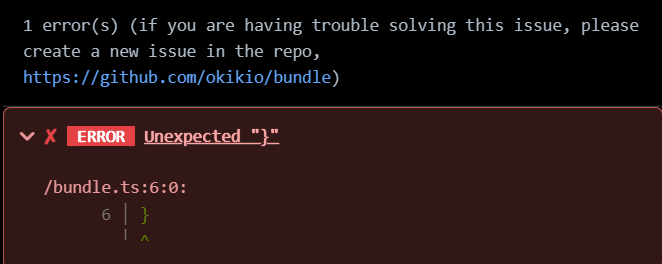
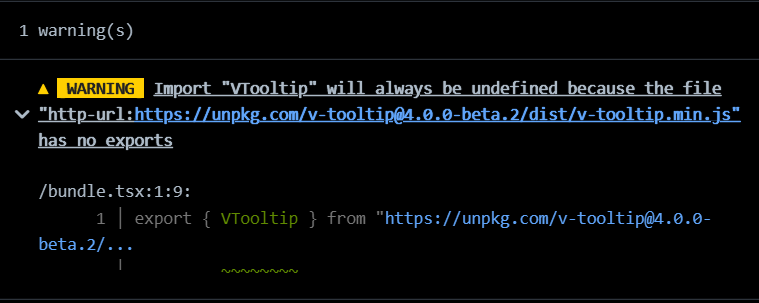
Console Errors & Warnings Errors look like this Warnings look like this Console Buttons The consoles were also given buttons to make them easier to navigate, they are these right here Console Extras Sticky Console: Sticks console scroll position to the bottom, for new logs. If you scroll Pet-peeve alignment: I get so annoyed when things that can align don
## Input and Output Tabs

With the addition of the console I wanted to ensure that the editors weren't unwieldy, so I created a tab bar for the input, output and config editor. The tab bar allows for quick access to all editors while ensuring that the `console` is always available.
## Configuration
In `v0.2` I added support for custom configurations (configs), it supports most of [esbuild's build options](https://esbuild.github.io/api/#build-api), as well as some added options to change the default CDN and the compression algorithm.
> The default config is
>
> ```ts
> {
> "cdn": "https://unpkg.com",
> "compression": "gzip",
> "esbuild": {
> "target": [ "esnext"],
> "format": "esm",
> "bundle": true,
> "minify": true,
> "treeShaking": true,
> "platform": "browser"
> }
> }
> ```
> When you click the share button, it will also share the custom config you've setup, e.g.
>
> ```ts
> {
> "cdn": "https://unpkg.com",
> "compression": "lz4",
> "esbuild": {
> "target": [ "es2018" ],
> ...
> }
> }
> ```
>
> The config above would result in this share URL [bundlejs.com/?q=@okikio/animate&config={"compression":"lz4","esbuild":{"target":\["es2018"\]}}](https://bundlejs.com/?q=@okikio/animate&config=%7B%22compression%22:%22lz4%22,%22esbuild%22:%7B%22target%22:%5B%22es2018%22%5D%7D%7D).
>
> Notice how `cdn` is missing from the share URL, that's because **bundlejs** smartly decides on which config to send as a part of the share URL based on how different the new config is from the default config.
> 📒 **Note**: There are 3 available compression algorithms, `brotli`, `gzip`, and `lz4`.
### CDN Hosts
> [Content Delivery Networks (CDNs)](https://en.wikipedia.org/wiki/Content_delivery_network) are a great way to distribute code all over the world at fast speeds. In the context of **bundlejs**, CDNs represent online repositories of code that **bundlejs** can fetch from.
>
> For example, [unpkg.com](https://unpkg.com) is a fast global content delivery network for everything on npm. It's used to quickly and easily load any file from any package on npm using a URL like: `https://unpkg.com/package-name@version/file.js`, a similar thing would apply for [skypack.dev](https://cdn.skypack.dev), [esm.sh](https://cdn.esm.sh), etc...
By default **bundlejs** lets you enter code like this,
```ts
export * from "@okikio/animate";
```
But behind the scenes **bundlejs** auto fetches that specific package from a CDN namely, [unpkg](https://unpkg.com).
> In older versions of **bundlejs** the default CDN used to be [skypack](https://cdn.skypack.dev) but because skypack doesn't have easy access to the `package.json` of node packages, I switched to using unpkg as the default CDN.
With later updates **bundlejs** recieved the ability to update the default `cdn` on a global or local scale.
Technical details and more info... You can choose CDNs by, (Global CDN) Setting the CDN config to a different CDN host,
e.g. (Local CDN) Using the CDN host as an inline url scheme, e.g. There are a total of 8 supported inline CDN host url schemes: After determining the CDN to use, the next step is to determine if the CDN host supports npm style modules, examples of which are unpkg, skypack, esm.sh, etc... The factors involved in determining that a CDN host supports npm style modules are that the CDN hosts supports: The CDN supports package versioning through the The CDN can load a node packages, 📒 Note: Without the Learn the story behind brotli support... No shade to the original creators of brotli-wasm and wasm-brotli (different packages, similar name) but the way both packages handle WASM forces devs to use webpack (which wasn
`deno-brotli` does 2 things right, they are,
1. It compresses the huge WASM file required for `deno-brotli` into an `lz4` compressed string, which can then be decompressed by `lz4` allowing for easy storage of the WASM as a js file (the result is great build tools support as the WASM is just a string inside a JS file, plus it solves the ecosystem problem really well).
> For `lz4` support **bundlejs** is using [deno-lz4](https://deno.land/x/lz4), which also runs via WASM, but the way [deno-lz4](https://deno.land/x/lz4) compress itself is slightly different than `deno-brotli`. I'd highly encourage you to take a look at the source code for [deno-lz4](https://deno.land/x/lz4) it's really informative.
2. By having the WASM as a js file you can actually preload the WASM as a js module 🤯

You can read through this tweet thread to learn more,
%[https://twitter.com/okikio_dev/status/1498898909879422977?s=20&t=iUL2EzC810kgGM6tn8nJeg]
#### Default to Gzip
**bundlejs** has used [gzip](https://en.wikipedia.org/wiki/Gzip) as the default for quite sometime, **bundlejs** used to use [pako](https://github.com/nodeca/pako), but thanks to a discussion with [@matthewcp](https://twitter.com/matthewcp/status/1503704061853450242?s=20&t=CDGJmTts_m2A9H7cyZfmew) who rightfully pointed out the `(De)compression Stream API`, I started looking into alternative to `pako`.
%[https://twitter.com/matthewcp/status/1503704061853450242?s=20&t=CDGJmTts_m2A9H7cyZfmew]
Learn the story behind gzip support... Thanks to the conversation with @matthewcp, I actually did some further research into More details... You use You can try it out below, bundlejs.com/?config={"alias":{"@okikio/animate":"@babel/core"}}. You use You can try it out below, bundlejs.com/?config={"esbuild":{"external":["@okikio/animate"]}}. Check out a complex example of using the external config bundlejs.com/?q=@babel/core&config={"esbuild":{"external":[...]}} Simple options Advanced options Quite a bit to work with I
## Editor Buttons + Extra Features...

The editor buttons add extra functionality to the editor, they enable easy access to common editor tasks.
The current list of editor buttons are:
Editor panel toggle Toggles on or off the editor buttons, leaving more space for the code editor. It looks like this when the editor buttons are hidden, Clear editor button Clears the editor of all its contents. Format code button Cleans up any messy code it finds. It uses dprint to format the input and output editor code, but falls back to monaco-editors baked in formatter for the config editor. Reset code button Resets the editor to it
Copy code button Copies the editors code, it
Wrap code button Toggles between This is how This is how Bonus features Bonus: You can access monaco
## Drag Handles...Interactive Fun
%[https://youtu.be/AMt01tFstik]
The new drag handles enable a more interactive experience with the editor, they are a little like the drag handles in vscode, but mobile friendly.
> **bundlejs** being mobile friendly isn't a huge focus point for the project, but it's nice to have if you ever find yourself in the need for **bundlejs** while on a mobile or touch enabled device.
## JSX Support
JSX is now officially supported in **bundlejs** 🎉.

> Ignore the red error lines, for some reason the [monaco code editor](https://github.com/microsoft/monaco-editor) doesn't want to work well with JSX 😅
To use JSX you need to set the `jsxFactory` and the `jsxFragment` config options according to the JSX based framework you are using.
e.g. for [Preact](https://preactjs.com/) the following config would be used:
{ "esbuild": { "jsxFactory": "h", "jsxFragment": "Fragment" } }
> Try out the [preact demo](https://bundlejs.com/?q=(import)preact,(import)preact/hooks&treeshake=%5B%7Bh,Fragment%7D%5D,%5B%7BuseState%7D%5D&share=KYDwDg9gTgLgBAE2AMwIYFcA29noHYDGMAlhHnAMIT4zBQAUA3nAQBbGYJTDkC+AlHEYAoAJAEyAZ3gBtCTQA0cScBhUaAXTgBeOOhUBlGKlr0ADPwDcYiXmlxUCBDrj1B2gHzLV6vDHr0xO5exHAA1HAAjFY2UvCS6ABGMFCoRC5uOl4qatR+AUFZcKEAtFExYtww6FDk9GKiADweDU0IxABuLJiokpLaAETyfnQDLaITTYnoMDBkcGQUmMQEANbajAnJqUS8HiWNAPTTs2Tjk41g3B6MwzC8R1fA5xONJ3Pki8trG44Ie2Eju8zq0ju0Oi9GuDur1+kM8rQoCUALbAPqoADmwDGt3YnG4eAeh3B5yO4xivCAA&config=%7Besbuild:%7BjsxFactory:h,jsxFragment:Fragment%7D%7D)
## Sharing Bundle Sessions
To share bundle sessions\* between multiple users (while avoiding the need for a server) we need a static and local way to store and share code between users. To solve this problem I decided to encode the bundle session\* information right into the URL, this was because I wanted the entire project to run offline, and I didn't want the high maintenance cost of a server and database.
> \*sessions are the specific state of **bundlejs** at a specific time, they are not the entire bundle session history, just the input code and the bundle configuration at the time the share button is clicked.
Technical details... A high-level summary of how this works is that users make a change in the input code editor, that change then gets saved and encoded into the URL. The URL can then be used to create replays of the bundle session. A sample session url is, The resulting input code of this bundle session url is this, with a config of, Treemap Chart Treemap charts are the most memorable form of bundle analysis chart, the inspiration behind this chart is webpack-bundle-analyzer. webpack-bundle-analyzer is the progenitor of bundle analyzers, and a great inspiration to the approach bundlejs took to creating charts. Treemap charts, Network Chart will use gzip compression for the charts, resulting in, Extra detail... For bundlejs a self-hosted version of umami is used, this is to ensure user data is kept private and secure. When trying to setup the self-hosted version of umami, I found that the article Setting up Umami with Vercel and Supabase by Jakob Bouchard, was a great help. The analytics are publicly available, check them out at, https://analytics.bundlejs.com/share/bPZELB4V/bundle Or click the page visit counter 📒Note: bundlejs is still using a page view counter, the view counter is powered by countapi (to the best of my knowledge countapi is now deprecated, however, the servers for the project are still up and running so I
%[https://dev.to/jakobbouchard/setting-up-umami-with-vercel-and-supabase-3a73]
## Discussions and Support
To encourage discussion, give support and to gain feedback, I added a comment section to **bundlejs**, I used [giscus](https://github.com/giscus/giscus) for this.
Initialy, when I created the **bundlejs** project I also created a [Github Discussion](https://github.com/okikio/bundle/discussions) for it as well. I didn't want to have the overhead of having to manage a Discord server, so I choose GitHub Discussions for chats about **bundlejs**. The problem is that no one really uses [Github Discussions](https://github.com/okikio/bundle/discussions), so I to integrated it right into the website itself via [giscus](https://github.com/giscus/giscus), this was so new users can easily interact with others, get support from me, and leave me feedback.
Technical details... giscus is an open-source comments system powered by GitHub Discussions, it lets visitors leave comments and reactions on your website via GitHub! It was heavily inspired by utterances. For bundlejs I
As of right now the comments section is looking really bare and basic, why not leave your mark. Leave a comment with what you love and what you think needs improvement in **bundlejs**, I'll go through them and try to integrate your ideas into **bundlejs**.
## Security and Performance
Security and performance are critical quality areas for **bundlejs**. In order to bundle modules together, **bundlejs** has to fetch multiple sets of modules from all over the internet, while ensuring that malicious actors don't get involved, and that [esbuild-wasm](https://esbuild.github.io) isn't taken advantage of to crash other devices.
> Some *really*...**really** large modules can take up to `4+ GB` of memory to be bundled properly by `esbuild-wasm`.
The security criterias I set for **bundlejs** were:
1. Don't leak personal user info.
2. Don't go through a central server, e.g. the ability to get node modules from various sources
3. Ensure people always know what packages they are bundling
4. Ensure people can't use **bundlejs** to maliciously slowdown browsers
To ensure I met the security criterias set,
1. I use strict Content Security Policies (CSP) for **bundlejs**, ensuring no unintended 3rd party can get involved.
2. I self-host as many of the 3rd party scripts I can. By enclosing the number of hands involved in [bundlejs.com](https://bundlejs.com) I reduce the chance that personal information is leaked.
3. I use sandboxing techniques e.g. `Web Workers` and `Shared Workers` to ensure the main thread runs at a smooth `60fps` while avoiding access to the DOM.
> [Web Workers](https://developer.mozilla.org/en-US/docs/Web/API/Web_Workers_API/Using_web_workers) and [Shared Workers](https://developer.mozilla.org/en-US/docs/Web/API/SharedWorker) are scripts that run on a seperate thread, by using Workers I am able to isolate potentially malicious code while ensuring that the main-thread isn't affected.
>
> Most of the uses of Workers were `Shared Workers`. `Shared Workers` reduce the performance impact of multiple instances of the **bundlejs** site/web app running on the same device.
4. To reduce the chance of **bundlejs** being used to maliciously slowdown browsers, I ensure the share URL is easy to read and understand, and by default disable auto-bundling for shared URLs.
The current browser landscape for `Shared Worker` support is spotty at best.
The support table looks like this,
| Browser | Shared Workers | [Module Workers](https://web.dev/module-workers/) |
| --- | --- | --- |
| Firefox | Yes | No |
| Chrome | Yes | Yes |
| Safari | [Yes\*](https://twitter.com/webkit/status/1506787526937235464) | Yes |
| \* Support is currently experimental, but should be coming in later versions | | |
> [Module Workers](https://web.dev/module-workers/) are esmodules that run in Workers.
> 📒 **Note**: I built a `Shared Worker` polyfill [@okikio/sharedworker](https://github.com/okikio/sharedworker). It's a small but simple polyfill that falls back to a regular `Web Worker` if `Shared Workers` are not supported. You can use it while waiting for the next version of Safari to support `Shared Workers`, or while supporting older versions of Safari.
> ⚠️ **Warning**: The [Shared Worker polyfill](https://github.com/okikio/sharedworker) doesn't handle module workers, you will still need to somehow compile your modules to non-esm versions to support workers in Firefox. You can view how **bundlejs** handles module workers in the [bundlejs source code](https://github.com/okikio/bundle/blob/main/src/ts/util/WebWorker.ts), you may also wish to view the [astro-repl source code](https://github.com/withastro/astro-repl/blob/main/src/utils/WebWorker.ts) to see how it handles module workers.
Most of the other security policies are passive in nature, e.g.
* **bundlejs** only bundling on page load if the URL has `?bundle` in it.
* **bundlejs** enforcing `https://` for all requests, including for iframes, etc...
* Only have properly vetted CDN hosts for **bundlejs** by default.
* etc...
## Tips and Tricks
> **Top tier tip**, follow me ([@okikio\_dev](https://twitter.com/okikio_dev)) and **bundlejs** ([@jsbundle](https://twitter.com/jsbundle)) on twitter; [shameless plug](https://www.urbandictionary.com/define.php?term=Shameless%20Plug) 🤣.
>
> I do post announcments and updates on these accounts, as well as small tips and tricks that help in making the most use of **bundlejs**.
* When bundling packages that also export CSS and other external files, [bundlejs.com](https://bundlejs.com) now checks the gzip/brotli size of these external files, however, it won't output the external files' code, this behaviour may change in the future but for now that is the approach I am going with. Keep this in mind this isn't a bug, however, if it causes confusion I am willing to change this behaviour.
* Treeshaking is available, but not all CDNs support access to each packages `package.json` so there might be slight package version conflicts. The only verified CDN with access to the package.json is https://unpkg.com. The other CDN's that are used either pre-bundle the code for us (this is hit or miss depending on the package) or they aren't full npm CDN's e.g. https://deno.land or https://raw.githubusercontent.com.
* Check the full devtools console for error messages and warnings, if you are having trouble debuging an issue in **bundlejs**, or even better yet enable `esbuilds` verbose logging when trying to debug issues, e.g.
```ts
{
"esbuild": {
"logLevel": "verbose"
}
}
```
Check out a [demo](https://bundlejs.com/?config=%7B%22esbuild%22:%7B%22logLevel%22:%22verbose%22%7D%7D).
* You can use custom protocols to specify which CDN's specific imports/exports module should use. If an error occurs such that you can't bundle a package properly, I highly suggest switching CDN's via either custom protocols or by changing the `cdn` config option. I recommend using custom protocols instead of the `cdn` config option when trying to debug issues with a CDN:
e.g.
```ts
{
"cdn": "unpkg"
}
```
or
```ts
export * from "unpkg:typescript";
```
Try using custom protocols to solve this [example issue](https://bundlejs.com/?q=@babel/core&config=%7B%22cdn%22:%22esm.run%22%7D) on **bundlejs**.
* For some packages a soft error occurs where the default export is excluded from the treeshaken bundle, the solution for this is to manually include the default export like so,
```ts
export * from "skypack:solid-dismiss";
// and
export { default } from "skypack:solid-dismiss";
```
> If you have a tip and trick you would like to share, post a comment below, or send me a [tweet](https://twitter.com/okikio_dev)!
## Contribute
The codebase is currently quite disorganized so, I'd suggest direct messaging me on [Twitter](https://twitter.com/okikio_dev) or starting a [GitHub Discussion](https://github.com/okikio/bundle/discussions) to discuss ways to contribute.
There is a lot of stuff happening on the **bundlejs** project and it can be very overwhelming, if you think you can still contribute by all means please do! I will eventually get to writing detailed docs, on how to contribute, and how everything works in the backend, look forward to it.
You can use a pre-made Gitpod dev environment to quickly get started with the project or to contribute quick changes to the project.
[](https://gitpod.io/#https://github.com/okikio/bundle/blob/main/README.md)
If you love the project, I'd welcome if you'd spread the word, my goal is to make **bundlejs** a viable alternative/replacement for [bundlephobia](https://bundlephobia.com/) and even local bundlers, but right now the project is so small that most people who'd benefit from it don't know about it. I'd love to see people using it.
Last note, **bundlejs** is now on [OpenCollective](https://opencollective.com/bundle), so if you'd like to contribute to it financially, it'd be appreciated.
## Conclusion
[**bundlejs**](https://bundlejs.com), a quick and easy way to treeshake, bundle, minify, and compress (in either [gzip](https://en.wikipedia.org/wiki/Gzip) or [brotli](https://en.wikipedia.org/wiki/Brotli)) your [typescript](https://www.typescriptlang.org/), [javascript](https://developer.mozilla.org/en-US/docs/Web/JavaScript), [jsx](https://reactjs.org/docs/introducing-jsx.html) and [npm](https://www.npmjs.com/) projects, while receiving the total bundles' file size.
**bundlejs** aims to generate more accurate bundle size estimates by following the same approach that bundlers use:
* Doing all bundling locally
* Outputing the treeshaken bundled code
* Getting the resulting bundle size
The benefits of using **bundlejs** are:
1. It's easier to debug errors
2. You can verify the resulting bundled code
3. The ability to configure your bundles
4. The ability to treeshake bundles
5. The ability to view a visual analysis of bundles
6. You can bundle offline (so long as the module has been used before)
7. Supports different types of modules from varying [Content Delivery Networks (CDNs)](#heading-cdn-hosts), e.g. CDNs ranging from deno modules, to npm modules, to random github scripts, etc...
The next time you need to bundle a project or you need to know the bundle size of a project, give [bundlejs.com](https://bundlejs.com) a try.
> 📒**Note**: There will be a follow up article to this one, going into the technical nitty gritty on how **bundlejs** works and how you can use what I've learned from this project to either create your own online bundler or an esbuild-wasm backed js repl.
---
Photo by [Okiki Ojo](https://okiki.dev/), you can find the image on [Dropbox](https://www.dropbox.com/sh/dmu48xw2dbfiyui/AAD-LGqX_zwpZYgyIgYpCelba?dl=0).
Originally published on [blog.okikio.dev](https://blog.okikio.dev/documenting-an-online-bundler-bundlejs)
Also, published on [Hackernoon](https://hackernoon.com/bundlejs-an-online-esbuild-based-bundler) and [dev.to](https://dev.to/okikio/documenting-an-online-esbuild-based-bundler-bundlejs-4m52)

 This is the scroll to top button. As new console logs are introduced, the console automatically sticks to the bottom, some users may find this behavior annoying so this button offers a quick and easy opt out, by taking the user straight to the top of the console.
 This is the scroll to bottom button. Basically a get to the bottom as quick as possible button, it
~50px away from the bottom this behavior no longer applies, if you scroll back to the bottom the behavior will apply again.
### Compression Algorithms
**bundlejs** offers the options of bundling using:
1. `brotli` - results in the smallest bundle size but it's the slowest
2. `gzip` - results in the 2nd smallest bundle size but it's faster than `brotli` (**default**)
3. `lz4` - results in the largest bundle size but it's the fastest bundle algorithm
> 📒 **Note**: Each compression algorithm has it's own story.
#### The Brotli Problem
[brotli](https://en.wikipedia.org/wiki/Brotli) is a compression algorithm that compresses data really well, however, it's very slow compared to other alternatives. Adding brotli was quite an undertaking with lots of ups and downs, but thanks to [Lewis Liu](https://twitter.com/lewisl9029/status/1498928788477857794?s=20&t=iUL2EzC810kgGM6tn8nJeg) on Twitter I was able to use [deno-brotli](https://deno.land/x/brotli) to include a WASM version of brotli in **bundlejs**.
{
    "cdn": "https://esm.sh",
    // OR
    "cdn": "skypack"
}
export { animate } from "skypack:@okikio/animate";
//                       ^^^^^^^  https://cdn.skypack.dev/@okikio/animate
skypack:react -> https://cdn.skypack.dev/reactunpkg:react -> https://unpkg.com/reactesm.sh:react or esm:react -> https://esm.sh/reactjsr:@oxi/result -> https://esm.sh/jsr/@oxi/resultdeno:preact -> https://deno.land/x/preactesm.run:react -> https://esm.run/reactgithub:facebook/react/main/packages/react/index.js -> https://raw.githubusercontent.com/facebook/react/main/packages/react/index.jsjsdelivr:react -> https://cdn.jsdelivr.net/npm/reactjsdelivr.gh:facebook/react/packages/react-dom/index.js -> https://cdn.jsdelivr.net/gh/facebook/react/packages/react-dom/index.js
@version URL tag (e.g. react@18).package.json file.
package.json you can
I eventually chose to replace [pako](https://github.com/nodeca/pako) with [denoflate](https://deno.land/x/denoflate) as the default compression algorithm for gzip, it's a bit faster and smaller than [pako](https://github.com/nodeca/pako).
#### LZ4, Gotta Go Fast

In order to use WASM in a portable way, [deno-brotli](https://deno.land/x/brotli) would compress the WASM binary file into a base64 string using `lz4` as the compression algorithm. I saw the oppertunity to add another compression algorithm, so I used the `lz4` ([deno-lz4](https://deno.land/x/lz4)) implementation used to compress the brotli WASM binary string (see [#the-brotli-problem](#heading-the-brotli-problem) for more info.), it was by far the easiest compression algorithm to add to **bundlejs** 🤣.
### Compression Quality
You can set the quality of the compression (from a scale of 1 to 11, with 1 being the least compressed and 11 being the most compressed), you can set the compression quality for any of the compression algorithms mentioned above by setting the compression config option to,
{ "compression": { "type": "brotli", "quality": 11 } }
> You can check out a demo here, [bundlejs.com/?config={"compression":{"type":"brotli","quality":11}}](https://bundlejs.com/?config=%7B%22compression%22:%7B%22type%22:%22brotli%22,%22quality%22:11%7D%7D).
### Aliases and Externals
Aliases are a way to redirect certain packages to other packages, e.g. redirecting the `fs` to `memfs`, because `fs` isn't supported on the web, etc... This wasn't a direct feature request but I felt it would be a good addition.
Externals are a direct feature request [issue#13](https://github.com/okikio/bundle/issues/13), it took a while but a good solution is finally a part of bundlejs, you use it the way you'd use the esbuild externals config option.
pako alternatives, I have 3 possible alternatives, they are denoflate (which uses WASM), deno-compress (which uses js), and CompressionStream (which is built into browsers), yay fun 🎉😅.
> No one else can understand my pain...I'm adding more feature to **bundlejs** as I'm writing this blog post, so it's just getting longer and longer and longer, etc.... 😅
>
> 
### Esbuild Config Options
[esbuild](https://esbuild.github.io/api) config options are exactly how they sound, however, with esbuild running on the browser there are some limitations on what esbuild can do, due to the lack of native filesystem access some options don't work or are rendered obsolete.
The supported esbuild build options are
aliases it like this,{
"alias": {
"@okikio/animate": "@babel/core"
}
}
externals like this,{
"esbuild": {
"external": ["@okikio/animate"]
}
}



wrapped and unwrapped code. Wrapping is all about making the editors code wrap around the constraints of the editors bounding box, removing the need to scroll horizontally to view all the code.wrapped code looks,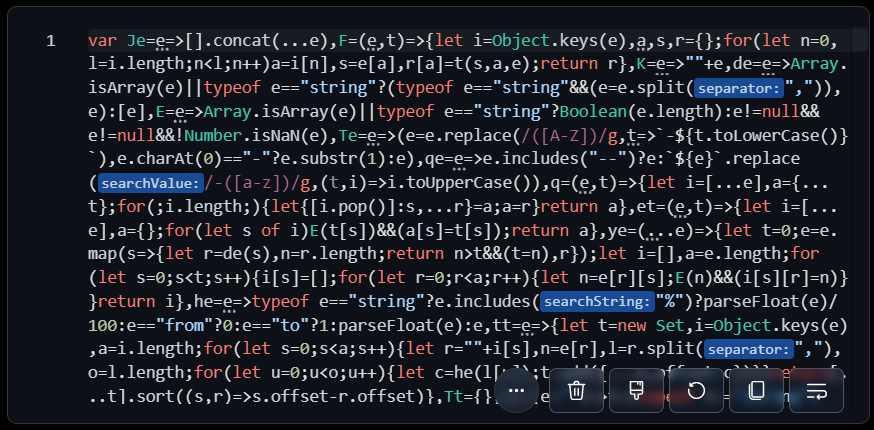
unwrapped code looks,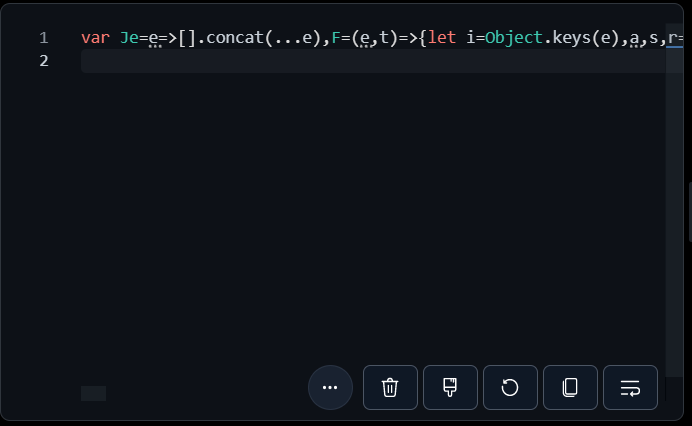
The URL breakdown is,
```ts
/?
q=(import)@okikio/emitter,(import)@okikio/animate,(import)@okikio/animate,(import)@okikio/animate,(import)@okikio/animate,@okikio/animate,@okikio/animate,@okikio/animate,@okikio/animate&
treeshake=[T],[{ animate }],[{ animate as B }],[* as TR],[{ type animate }],[*],[{ animate as A }],[* as PR],[{ animate }]&
text="export * as PR18 from \"@okikio/animate\";\nexport { animate as animate2 } from \"@okikio/animate\";"&
share=MYewdgziA2CmB00QHMAUAiAwiG6CUQA&
config={"cdn":"skypack","compression":"brotli","esbuild":{"format":"cjs","minify":false,"treeShaking":false}}&
bundle
```
* `q` or `query` represents the module, e.g. `react`, `vue`, etc...
You can add `(import)` in-front of a specific module to make it an import instead of an export
* `treeshake` represents the export/imports to treeshake.
The treeshake syntax allows for specifying multiple exports per package, through this syntax
```ts
"[{ x,y,z }],[*],[* as X],[{ type xyz }]"
// to
export { x, y, z } from "...";
export * from "...";
export * as X from "...";
export { type xyz } from "...";
```
The square brackets represent seperate packages, and everything inside the squarebrackets, are the exported methods, types, etc...
* `text` represents the input code as a string (it's used for short input code)
* `share` represents compressed string version of the input code (it's used for large input code)
* `config` represents the bundle configuration to use when building the bundle
* `bundle` tells **bundlejs** to bundle the input code on start-up. This isn't on by default for security reasons. I want to discourage people from sending large complex bundles that crash browsers or that take a long time to load, especially before the input code is properly verified as non-malicious. So, if you want to bundle the code on startup, you have to manually add `&bundle` to the end of the url yourself.
The reason why I decided on this syntax is because it allows for a lot of flexibility, and transparency concerning what is being bundled. I also wanted to make it easy to share bundle session between users.
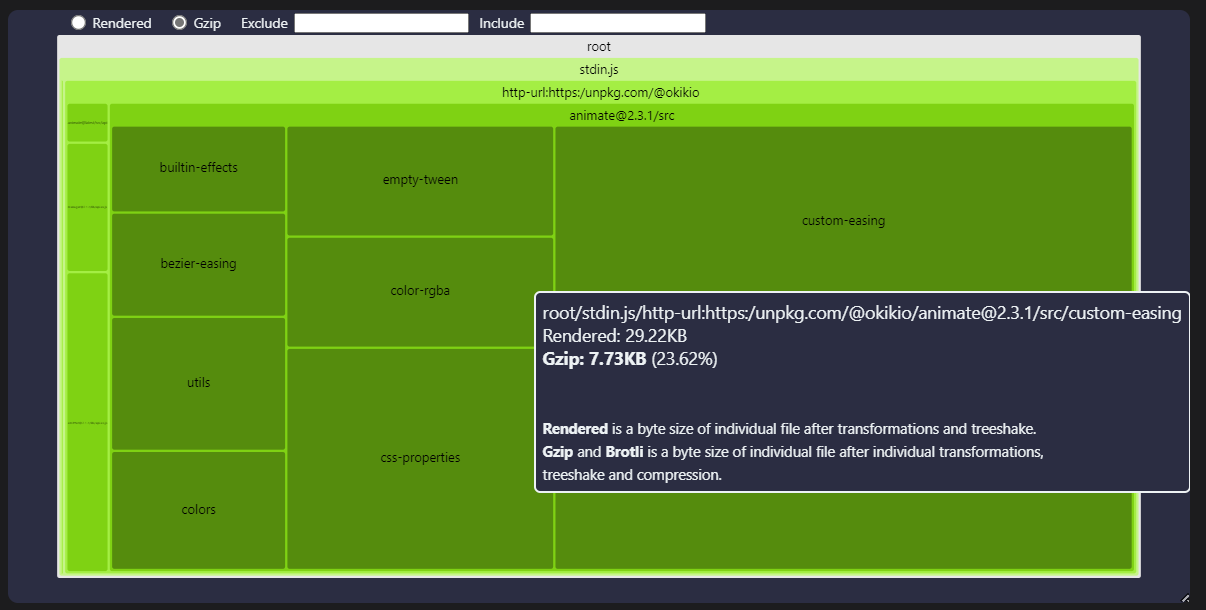
## Bundle Analysis
**bundlejs** can analyze and visually represent bundles as easy to navigate and easy to understand charts.
Using a port of [esbuild-visualizer](https://github.com/btd/esbuild-visualizer) and [rollup-plugin-visualizer](https://github.com/btd/rollup-plugin-visualizer) by [@bardadymchik](https://twitter.com/bardadymchik) I added the ability to visualize bundles, this feature comes from a feature request by [@atomiks](https://github.com/atomiks) on [issue#22](https://github.com/okikio/bundle/issues/22#:~:text=Further), the issue is still open you can make suggestions to improve this feature.
The bundle analysis charts are displayed right under the editor, like so,

The charts displayed comes in 3 distinct flavours:
/?q=(import)@okikio/emitter,(import)@okikio/animate,(import)@okikio/animate,(import)@okikio/animate,(import)@okikio/animate,@okikio/animate,@okikio/animate,@okikio/animate,@okikio/animate&treeshake=[T],[{ animate }],[{ animate as B }],[* as TR],[{ type animate }],[*],[{ animate as A }],[* as PR],[{ animate }]&text="export * as PR18 from \"@okikio/animate\";\nexport { animate as animate2 } from \"@okikio/animate\";"&share=MYewdgziA2CmB00QHMAUAiAwiG6CUQA&config={"cdn":"skypack","compression":"brotli","esbuild":{"format":"cjs","minify":false,"treeShaking":false}}&bundle
// Click Build for the Bundled, Minified & Compressed package size
  import T from "@okikio/emitter";
  import { animate } from "@okikio/animate";
  import { animate as B } from "@okikio/animate";
  import * as TR from "@okikio/animate";
  import { type animate } from "@okikio/animate";
  export * from "@okikio/animate";
  export { animate as A } from "@okikio/animate";
  export * as PR from "@okikio/animate";
  export { animate } from "@okikio/animate";
  console.log("Cool")
  export * as PR18 from "@okikio/animate";
  export { animate as animate2 } from "@okikio/animate";
{
      "cdn": "skypack",
      "compression": "brotli",
      "esbuild": {
          "target": ["esnext"],
          "format": "cjs",
          "bundle": true,
          "minify": false,
          "treeShaking": false,
          "platform": "browser"
      }
  }
## Analytics
When I initially built the project I only used a simple page view counter, I wanted to view how popular the project was without violating user privacy, it worked but I felt it could be better, so I decided to also use [umami](https://umami.is) as a privacy preserving, cookieless, open source, Google Analytics alternative, to which the analytics are public for anyone to view.
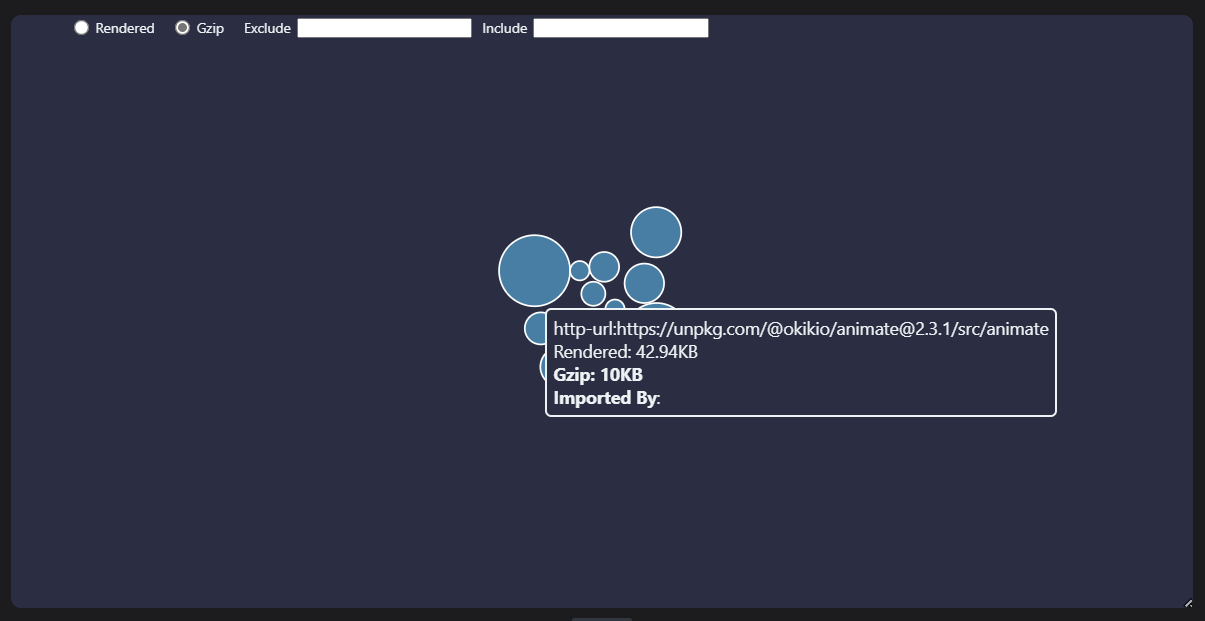 {
"compression": "gzip"
}
{
"compression": "gzip"
}